09:23
Top 60 Australian Tourist Destinations
Posted by tomachi on May 18th, 2010 filed in Google Adwords, Online MarketingI just did a bunch of search phrase research into the subject of Coach Tours and other tourism tour related search queries while building up an Adwords campaign for Tour Sale Finder Australia, with a view to creating adgroups around each theme.
And here they are, sorted alphabetically:
Adelaide
Alice Springs
Alice Springs To Ayers Rock
Atherton Tableland
Australian Capital Territory
Ayers Rock
Barossa
Blue Mountains
Brisbane
Broome
Broome To Darwin
Bungle Bungle
Byron Bay
Cairns
Canberra
Cape Tribulation
Cape York
Cradle Mountain
Darwin
Darwin To Broome
Darwin To Perth
East Coast Australia
El Questro
Flinders Ranges
Fraser Island
Gold Coast
Great Barrier Reef
Great Ocean Road
Hobart
Hunter Valley
Kakadu National Park
Kangaroo Island
Karijini
Kata Tjuta
Katherine Gorge
Kimberley
Kings Canyon
Kuranda
Launceston
Melbourne
Moreton Island
New South Wales
Northern Territory
Outback
Perth
Perth To Broome
Pinnacles
Pinnacles Desert
Port Arthur
Port Douglas
Queensland
Red Centre
South Australia
Surfers Paradise
Sydney
Sydney To Melbourne
Tasmania
Townsville
Victoria
Western Australia
Whitsundays
Using Formulas For Find & Replace in Excel
Posted by tomachi on April 26th, 2010 filed in Google Adwords, Online MarketingNow this is what I call a spreadsheet!
Here you can see an 8,000 row spreadsheet in Excel 2007 which is being used to prepare a bulk upload into Google Adwords editor, for use in the Adwords campaign for Fetch RV Rental Spain, one of my companies many motorhome hire websites.
It's here mostly because of the cool "trace dependants" arrows in blue, many they look trippy. But the other reason I am posting this, is to provide some help and guidance for other search marketers out there on some tips and tricks for doing really large campaign rollouts in AW editor.
Those tips are underneath, here is the screenshot:
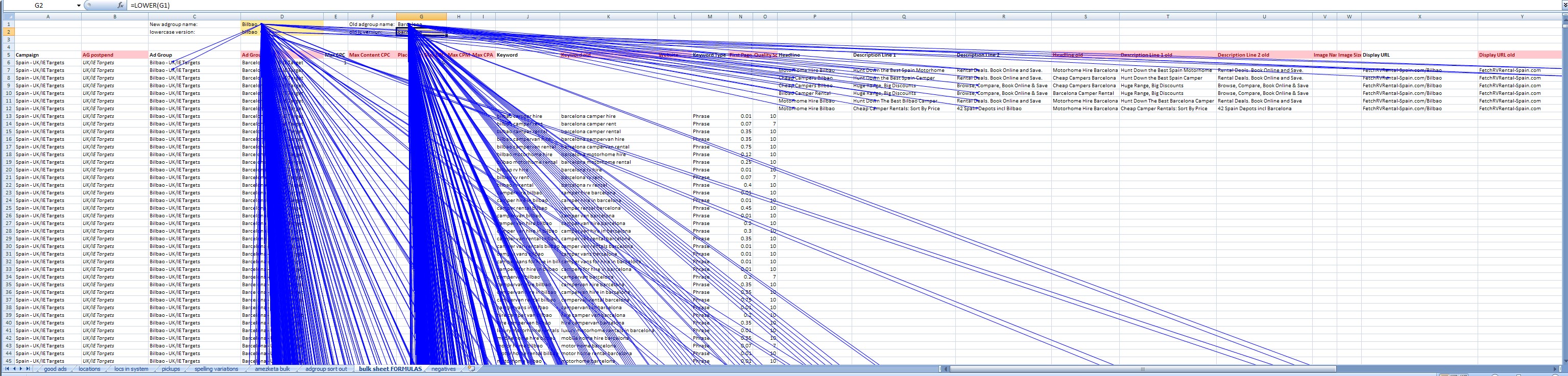
Trace Dependants in action
Adgroup names
These have been made using the following function: =CONCATENATE(D$1, " - ", B8106)
What this does, is generate brand new adgroup names according to what's in constant cell D$1 ("Bilbao") and attached onto the end of this whatever is in the B column which shuffles through the various campaign geotargetting settings. You can see "UK/IE Targets" here, but further down this changes to "EU Target" later on down the sheet.
Keywords
Instead of using the GUI part of Excel like a normal person (you know - Find and replace), I've used the dynamic version of the same: The substitute function. This one looks like this: =SUBSTITUTE(K13, $G$2, $D$2). So it takes cell k13 ("barcelona camper hire"), then looks for G2 ("barcelona") and swaps it for D2 ("bilbao"). Very tidy.
Ad Creative - Titles and Descriptions
Again the substitute function is deployed: =SUBSTITUTE(S7, $G$1, $D$1)
Same story here, we are taking a line from the existing creative, search and replacing it so a creative like this:
Hunt Down The Best Barcelona Camper
Rental Deals. Book Online and Save
FetchRVRental-Spain.com/Barcelona
is automatically turned into this:
Hunt Down The Best Bilbao Camper
Rental Deals. Book Online and Save
FetchRVRental-Spain.com/Bilbao
This works pretty well but can cause problems if you reach the 25 or 35 character limits.
Ad Creative - Display URL and Destination URL
These work in the same way as the other replacements, but I have nested a further layer of substitutes, to remove the space and convert that into an underscore.
Display URL: =SUBSTITUTE(CONCATENATE(Y7, "/", $D$1), " ", "_")
Destination URL: = SUBSTITUTE(SUBSTITUTE(AA7, $G$2, $D$2), " ", "_")
The Display URL uses a concatenate to simple join the placename to the end, but also to put a / slash in between. The destination url uses two substitutes, one to swap out the keyword for one which could have a space in it, and then another set to replace the space with an underscore.
Strange redirection loop when logging out of Google services
Posted by tomachi on April 25th, 2010 filed in TechnologyI was on YouTube the other day and it instructed me to logout just before creating a new YouTube account based on my Google account. After clicking the link, it cycles through a bunch of Google ccTLD domains like com.br, .cn, .es, .fr etc, then finally lands at a URL similar to below then stops.
I wonder if other people are experiencing similar issues? Its' no show stopper, but does seem quite weird. I've even seen examples where clicking "logout" doesn't actually log you out, which is a pretty serious security flaw.
https://www.google.com/accounts/Logout2?ile=1&ils=adwords.CN,adwords.ES,adwords.FR,adwords.IT,adwords.JP,adwords.MX,adwords.PT,adwords.TR,adwords.UA,s.NZ&ilc=5&continue=http://www.youtube.com/create_account&zx=-[id number removed for blog]
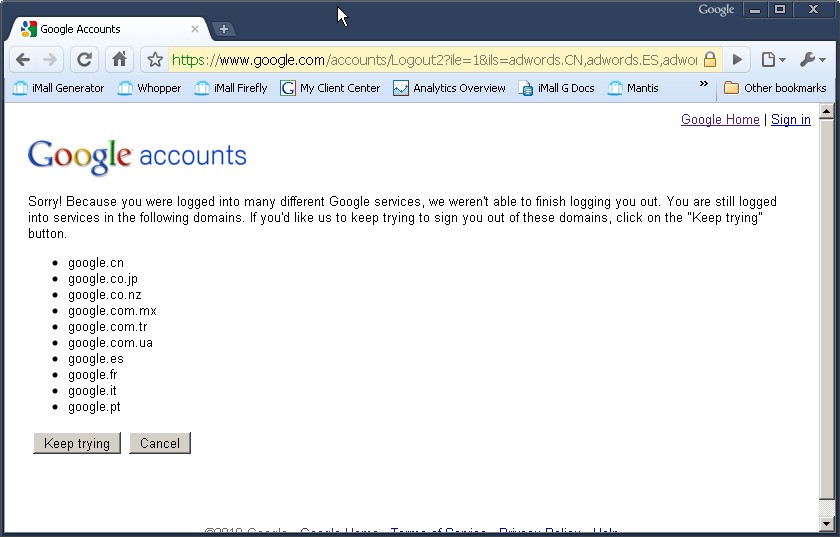
Strange Google Logout Error
The chain of redirects in Chrome shows the page titles of these logout screens cycling through various languages supported by Google:
09:23
09:23
09:23
09:23
09:23
09:23
09:22
09:22
09:22
How to use WGET to show HTML source code
Posted by tomachi on January 20th, 2010 filed in UnixIf you are logged into a Unix shell, say like the Terminal on Mac OS X, or bash in Linux, sometimes you want to show a web pages source code. I use this for checking a pages source code from another location outside my network. This is helpful if you have a strong proxy server that is preventing you from getting the latest copy of a webpage during development.
Display the HTML source code for Google.com:
wget -qO- http://google.com | cat
There you have it.
If you actually want to save the file to a local file and also display it, use this instead:
wget -q -O file "url"; cat file
Analytics URL Tagging How To
Posted by tomachi on December 13th, 2009 filed in Google Analytics, Online MarketingSometimes its not possible to easily figure out where you're traffic is coming from in Analytics - the referrer is a great feature of browsers and tells Google Analytics what page you were on when you clicked, but sometimes this doesn't work as you'd expect, or give as much separation / joining of the data as you might like for larger linking sites, networks and channels.
Examples for using URL tagging:
- Email Marketing
- Large multi site links (eg Facebook inbound clicks)
- Paid campaigns spread across a lot of sites
- Identifying which exact link inside a page was clicked if there are more than one
- Removing developer and staff hits to homepage easily
Email Marketing
If you don't like seeing loads of single line, single user visits from load-balanced webmail domains like the ones below, you should think about using URL Tagging in your email marketing links:
| by130w.bay130.mail.live.com |
| webmail.clear.net.nz |
| bl147w.blu147.mail.live.com |
| nz.mg1.mail.yahoo.com |
| mail.google.com |
| au.mc563.mail.yahoo.com |
This is because people are reading their email in a webmail client... which is seen as a referring website in GA when they arrive... so you see why these come up as referrers, but its not exactly helpful. For the initial click on that email, with URL Tagging, you will see all the clicks in one place under "Campaigns".
The Anatomy Of a URL Tag
If you have not seen it already, get yourself over to Google's "URL Builder Tool" here: http://www.google.com/support/analytics/bin/answer.py?hl=en&answer=55578
This will help you build an Analytics URL Tag using just the destination URL and some keywords you choose. Initially it can be confusing understanding which element/parameter goes where in GA reports. This article is designed to help you understand this.
Campaign Source:(referrer: google, citysearch, newsletter4)
This term can potentially wind up in your Traffic Sources --> Referrers report, and literally replace the referring domain name with your keyword. If you wish for the domain to be included you will have to actually put the domain name here. However, it will only appear here if the medium is set to referral. If you set this to say "email", or spell referral wrongly, then you will have to go looking for it in your Traffic Sources --> All Traffic Sources report. I've been using a Twitter tracking service that adds "micro-blog" as my medium but considering changing this back to referral so I can see it blend into all Twitter referrals.
Campaign Medium:marketing medium: cpc, banner, email)
Check your Traffic Sources --> All Traffic Sources report to get a feel for what this does. The default possibilities are as follows: organic, cpc, (none), referral. This keyword can be seen just after the slash next to the source, so examples for this website are: google / organic, (direct)/(none), yahoo / organic, google.com / referral (this is traffic from my Google profile page which is a direct link, hence the tag referral from Google when you would normally expect a "organic" or "cpc" for paid), liquorboxwine.co.nz / referral (this is my mate Greg's site which has a link to me), twitter / micro-blog (this is me testing out my new Tweet tracking Firefox plugin called "Snip-n-tag" that ties into the Bit.ly URL shortener service - pretty neat and saves a lot of time if you Tweet a lot and want to track it), and finally AMU / email which is clicks coming from my Auckland Music Update newsletter.
Campaign Term: (identify the paid keywords)
Personally, I don't use this feature often, but the idea here is that the term or keyword chosen will also appear in your Traffic Sources --> Keywords report. The reason I don't use it is: a) GA has built-in intelligence to know how to pull the users search term from organic traffic for a great range of search engines including Yahoo, Bing, Yandex etc. b) Paid search traffic from Google already automatically pulls in the matched keyword in the Adwords account. It doesn't pull the users actual query however, but I have found a way to get this using an advanced filter (will do a post on this at some stage). c) INSERT MORE LATER ####
Campaign Content:(use to differentiate ads)
This one is best used like they say: to denote variations in creative, or if there are many links on a page, to differential which link is which.
Campaign Name: (product, promo code, or slogan)
Something time related; I usually vary this occasionally, but try to keep my "source" very consistent over time.
Multi Site Links
Lets say you have a large network of sites, with a navigation bar at the top interlinking them, plus some other deep links spread across the content of various pages. You can see referral traffic in your referral report in Analytics, and you can also see which page is sending the traffic, but you want to segment the traffic further to see if its coming from the site-wide top navbar on every page, or from the sporadic body-copy links that sometimes appear in articles or blog posts.
This can be acheived in two ways, both using URL tagging. One way will remove traffic from referrals report, and the other won't. The idea is to be careful which method you use so as not to disadvantage yourself. Basically, if you set utm_medium to something other than "referral", this will cause the traffic to vanish from your main referral report; whereas leaving it not set (or set to utm_medium=referral) should allow the traffic to be seen in the main "Referring Sites" report.
Method that also appears as Referring Sites report
Use the "ad content" parameter (utm_content) to denote the link in question you are interested in, for example, in the URL below the content tag is set as "content":
If you were to click this link, I could tell a) its from funk.co.nz using the plain old Referring Sites report (nothing new here), then cilck the domain to see b) what sub-page on the site sent the traffic. But since the sub page (this blog post) also contains non-tagged links, I wouldn't be sure if it was from navbar or content. By pulling down the "Segment by" drop-down menu:
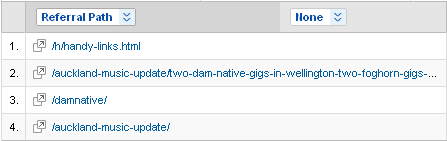
Once you pop open the menu (by clicking "Referral Path") you can select "Ad Content":
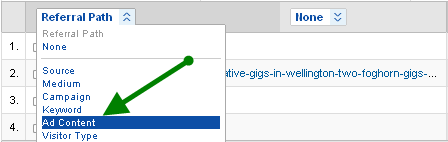
This will then show me, assuming every link is tagged, exactly which link was clicked. This could be handy if you are doing multi-variate testing of which button or ad creative version is most attractive to users for example.
Method that makes it disappear from Referring Sites report
Basically, using anything other than utm_medium=referral will remove your traffic from this global report. This may or may not be what you want. For example, my blog is used as the source material for the emails that I send out in my Auckland Music Update email newsletter. I've been looking into tagging these links to see who and how many clicks I'm getting. Trouble is, this same tag is still live in the historic blog posts, and looks like this:
http://www.damnative.com/?utm_source=AMU&utm_medium=email&utm_campaign=AMU-194
This works great for emails - with "email" set as the medium allows you to see all your email traffic in one view, so you could round up the whole years traffic and take a look; by changing the campaign for each email send out, but leaving source the same allows further segmentation, and also to pull out the "AMU" emails from any other emails that I might have been sending but also using medium=email for.
To summarise, you need "some things the consistent, some things uniqe" for the best of both worlds in segmentation.
Paid Campaigns Spread Across A Lot Of Sites
Normally, you'd want to track each website separately, but if you have a really really large network (lets say a network of 10,000 sites where 25% are sports, 25% music, and 50% business), and you want to be able to conglomerate and segment it somewhat, URL tagging might be able to come to the rescue.
Having said that, its ideal to also continue to be able to drill right down to the separate site (the one out of 10,000 in network), so be sure to be careful how this is done.
Use utm_source as the domain name of the site (in my example I've used fake sites like sports.funk.co.nz to illustrate the point - but this site doesn't exist), medium as referral still, I've used a consistent content value of "AnalyticsURLTaggingHowTo", but I've then invented 3 unique campaign names:
So the idea is that utm_campaign=URLTagNetworkExample-Sports would appear on 25% of sites, URLTagNetworkExample-Music on the music sites, and URLTagNetworkExample-Business on the remaining 5,000 business sites.
With this setup you could then compare the performance, side by side, of each network (sports, music or business), and make some decisions on what your next move will be. This is a bit easier than trying to come up with a regular expression to group your sites together, or just to try and deal with a large list of referrers based on their domain name.
Some sites aren't obvious what its about just from reading the domain name, and some sites might carry both sports and business news... so you could tag these differently, something which wouldn't work with just a normally pair of creatives both going to the same landing page.
Remove developer or staff hits to site
This one relates to the way staff members, webmasters, and developers access the site. Most people will navigate using one of the following methods:
- Set work browser to work website homepage (or other useful sub-page)
- Use a bookmark
- Follow link from Intranet
- Follow link from Email Signature
In the first two instances, this traffic will be "direct". From Intranet might show some unroutable referrer like http://widgetsco-intranet/ which is clearly a fake domain; from email sig might show either :::Outlook Blocked::: or by130w.bay130.mail.live.com say, neither of which is very useful.
By somehow forcing all your staff to use utm_source=StaffMemberBookmarks in their bookmarks enables you to segment these hits out, even if you have a roaming workforce that accesses the site from many different IP address. Naturally, if everyone uses it from one IP address or range, you should be using an Advanced Filter to tag them by IP address, but this method gets around that.
For your intranet, you can just tag the links to your homepage accordingly, for example:
http://www.funk.co.nz/?utm_source=URLTaggingPostClicks
or:
http://www.funk.co.nz/?utm_content=URLTaggingPostClicks
Will let me know that someone must have somehow gotten all the way to the bottom of this post and clicked. Whether you use "source" or "content" is upto you. I'd say content is probably more sensible.
Google URL Builder Tool
Finally, you'll be wanting to checkout this tool from Google, which makes building the URLs a lot easier:
http://www.google.com/support/analytics/bin/answer.py?hl=en&answer=55578
Investing in Green Tech
Posted by tomachi on December 13th, 2009 filed in Economy, Environment, PoliticsI personally love the idea of investing in Green Tech. The government needs to setup a "clearing house" website where all the available options are indexed and catalogued.
For example, I understand in NZ the government has provided:
- interest free loans for solar power?
- insulation support?
- no road user charges for 4 years for electrics (heck make is 20 years!)?
I reckon 5 to 8 years would have been better to allow companies to justify some serious expenditure on electrics and hyrbid.
Also, where is the support for Bio Fuels?
I would like to see:
- No parking fees for hybrids / electrics / and ultra-low emissions vehicles
- Link bus frequency dropped from 10mins to 9mins peak hour, and from 20mins down to 18mins off peak.
- Force power retailers by law to pay house-hold generators the full retail price for power reversal (not the wholesale rate).
- A weekly lottery - each week someone gets a full-on 5kw solar panel and grid-synchroniser setup for their home: so they can sell power back to the grid.