Confused about NZ and Palestine / Email: to W.Peters, T.McClay, green.party
Posted by tomachi on August 13th, 2026 filed in News, PoliticsJust wrote this long email to NZ First...
Confused about NZ and Palestine / Email: to W.Peters, T.McClay, green.party
Facebook post shatters record for number of comments in 24 hours
Posted by tomachi on May 20th, 2026 filed in Politics
Source: a wild guess / bullshit. If anyone at Facebook could inform me, that would be marvelous.* Whether or not Splore festival founder John Minty's post [1] is or isn't New Zealand's or even Auckland's post comment record holder is something I'd love to know if true. In 19 hours it attracted 361 comments and 3 shares, and at least one blog post including this one. So why on Earth have I made this copy of the post comments?
Facebook Comments Supporting My Upcoming Official Submission of Complaint to Auckland Transport & Council
I plan to refer to this text in an upcoming complaint to ACC and AT (Auckland City Council and Auckland Transport) about their crappy road "upgrades" and future designs.
Facebook
John Minty's post
John Minty
npsoSrtdeo9f308cflflh09aih66a9lgl59193h7tf57251i24917945fh68 ·
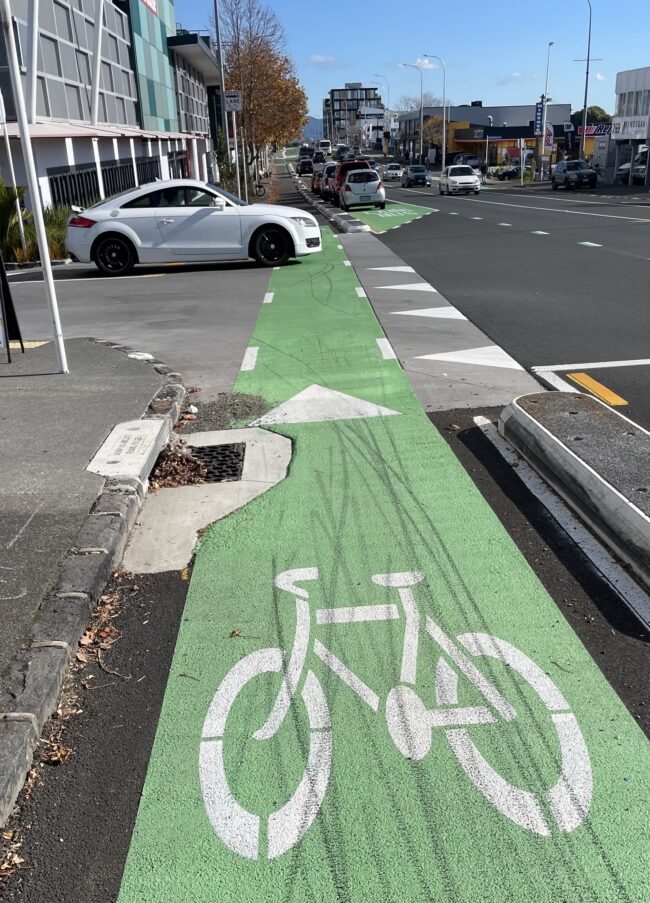
Five cars swerved into me today on a 700m trip to K Rd. A common occurrence as can be seen by all the bike brake marks at every intersection. I guess we need more cyclists using these dedicated lanes so that motorists become a bit more attune to our presence!
Stewart Neumann
4m Reply
Rob Willis
Shit design for cars and bikes. End of.
6m Reply
Tomachi Nosnikta
This is a classic unintended consequence of the insane changes to K rd which I hate. NZ sucks at this stuff. How can we (bike riders) use them with extreme curbs of such magnitude? If a car is unable to mount and cross such curbs, they are steep enough to dent and puncture a bikes tire (my tires are very thin racers that get deflate by this impact). They MUST be degraded with ramps the full length to enable graceful on/off-ramping for both cyclists and heavy trucks deliveries and **fire trucks**. Also, I use the sound and vision of extreme brake lockup to signal other road users of my rapidly changing flight vectors + a whooshing sound I make similar to "shushshshsh" (white noise siren = very audible). If/when I am elected as mayor of Auckland I will remove or degrade them so bikes can re-enter the car lanes in order to progress in a straight line more visible to cars. "Riding in the centre of road" is a ballsy and assertive stance that I recommend to bike riders (go hard or go hospital / give way?) furthermore **where** should a bike rider be if she wishes to turn right from K road? The centre of the road! It equates to our right-turn signal. It's hard to signal on a bike. Riding the centre does it for me. Unless big no right turn signs exist (I'm not sure about no right turn signs and bikes... aren't they more for traffic flow than safety? If true, then fuck them, they aren't relevant to riders, right turn away, it's my problem if I head-on impact a car which I can easily see in front of me!) mostly this would not impact congestion more than say dis-mounting and pressing the pedestrian crossing button - I assume car drivers would prefer me to gracefully turn right during green signal than say to get a red light to let non-existent pedestrians cross. Again... how can we use them with curbs like that?
59m Reply
Adrian Penman
Unfortunately, he car needs to move out to see traffic and could be there for some time. In this situation the bike lane needs to be a give way or stop. Not ideal for the cyclist but probably the safest option. No reason bike lanes should have complete freedom when its a safety issue
7h Reply
Steve King
Adrian Penman I believe he’s talking about vehicles overtaking and turning in front of him, not exiting.
6h Reply
Adrian Penman
Steve King then stopping on the bike lane is even more important from the cyclist safety perspective.
4h Reply
Michael Morrow
Adrian Penman the bike lane already is a giveaway (🔼)👍 classic case of cyclists thinking they're above the law.
6h Reply
David Batten
As a local resident I can tell you this is a controlled intersection - the vehicle has to either giveaway or stop for  ALL traffic on GNR. Secondly, both directions of traffic flow are visible from the marked line - it was designed this way. Drivers need to start being aware and respectful of other modes of transport that have just as much status as a car on this section of road.
5h Reply
Deb Leigh
David Batten do they pay RUC, insurance, rego or ACC levies? If not so, they do not have equal status
4h Reply Edited
James Littlewood
Deb Leigh guess what - roads are paid for by taxes. RUCs are for upkeep. Cars are heavy and damage the roads more by many orders of magnitude. Don’t let the user-pays mentality spoil your day.
3h Reply
Deb Leigh
James Littlewood take much more than that to spoil my day 😉 the principle stands
3h Reply
Mat Kunzi
Deb Leigh we have the same problem outside the hospital in Newtown wellington, there is a speed bump in the cycle lane and you end up stuck in the middle of the cycle lane when you're carefully trying to check to see on coming traffic. It's only really a problem for those hours in the morning and afternoon when people are commuting.
I watched a cyclist curse out a driver for being in the cycle lane , people need to chill out.
I like the idea of having cyclist give way zones where it's obviously problematic
3h Reply
Kevin Chen
David Batten definitely not visible from the marked line. I have been on that road multiple time where I couldn’t see the left side traffic because it’s blocked by cars like in the grey red.
2h Reply
Kelly Williams
Deb this is a false mentality on who has rights to the roads.
We all pay taxes.
We all adhere to the same rules which are designed to ensure safety for all.
Most if not every adult who owns a bike, ALSO owns a car. But there are multitudes of teens using bikes to get to and from school or people who are just choosing a bike in favour of stress, money,
environment, fitness etc who all have equal right to exist in society and travel to their destinations safely.
2h Reply
Deb Leigh
Kelly Williams did I say they didn't have rights? Wow, who TF are you to tell me about false mentality? My comment stands. As a pedestrian would stop and check all direction before crossing that corner, so should a cyclist. They should not be stating equal status, or demanding anything, until there is some kind of contribution
2h Reply
Ross McCorquodale
David Batten The photo shows very clearly that the driver of the white Audi cannot see what is coming from the left - even when it is obstructing the cycle lane like that!
The law says that you must stop where you can see, but it's a very common situation that you cannot see until your vehicle is actually right in a live lane.
1h Reply
Eric Wolff
James Littlewood Guess what! Local roads are paid for through local body rates, with a smaller portion coming from Central Government taxes. Road User Charges which only diesel and electric vehicles pay, and they are higher than what petrol takes in road taxes, contribute towards roading. Neither taxes on petrol nor RUC's are enough to cover the costs of the national roading network. Planning, building, and ongoing maintenance is subsidised by general taxes to cover the difference. Perhaps if motorists paid the full price, but motorists would certainly complain.
1h Reply
James Pepping
Kelly Williams sounds all good on paper but not when the public get to it so drop the arrogance we all share the road but some think it’s their own Tour de France and don’t look up
54m Reply
Dave Compton
David Batten as a local resident I can confirm that’s not common sense and most drivers don’t approach it like that
44m Reply
David Batten
This road/footpath and others within municipal authorities are / were paid for by Council rates. Council rates paid for the introduction and removal of trams and trolley buses,150 odd years of maintenance and the current bus fleet (albeit with government subsidies) using this road. The introduction of this cycleway has been funded 51% via NZTA/Waka Kotahi ($$ originally allocated by the John Key National government) and 49% Auckland transport via council rates. The outcome should be viewed as a modally neutral transport space where every traveller has a right to proceed in safety.
18m Reply
Dean Van Beelen
Adrian Penman how would visibility be any different if the bike lane was a car lane?
A stop or give way sign for cyclists would be stupid for a multitude of reasons. (especially a stop sign, which shouldn't exist for cyclists in the first place)
3h Reply
Adrian Penman
Dean Van Beelen suit yourself. Hit the car and find out.
2h Reply
Dean Van Beelen
Adrian Penman just because your idea was the wrost idea possible, doesn't mean it couldn't be improved in some other way.
Cycling is far more popular in other counties and they don't seem to have this issue.
1h Reply
Karen Tregonning
Adrian Penman so true, bikes need to wait before crossing the road not just going
3h Reply
Jason Bryant
Adrian Penman absolute clown
2h Reply
Paul Mitchell
Adrian Penman agree with you
1h Reply
Alfred Gee
Adrian Penman unfortunately he should break the law? You don’t edge out ffs and no, the cyclist does not have to give way. wtf did you get your licence?
1h Reply Edited
Marcus Perry
Adrian Penman your interpretation is an incorrect, motorist centric opinion, not based on the rules of the road code.
1h Reply
Adrian Penman
Marcus Perry that sir may indeed very well be the case, but rules may not necessarily keep your arse alive, especially if you're relying on others to be playing by them.
50m Reply
Marcus Perry
Adrian Penman i agree. When riding in bike lanes im vigilant for my own protection, but I also promote motorists not being so uninformed and selfish. I can do two things at once.
27m Reply
Colin Chapman
In a car you have to pull forward at this junction in order to see on-coming traffic. You can't blindly pull into the road, so you have to stop across the cycle lane. Cyclists need to slow down for their own safety.
50m Reply
Dave Compton
Colin Chapman much like pedestrians
44m Reply
Clinton Williams
Maybe the bikes should slow down so they can stop without a lockup? It’s a bike lane not a race track.
18h Reply
Richard Vanderaa
Clinton Williams So should other motorists go slow incase the car cuts them off? It's not a racetrack.
17h Reply
Clinton Williams
Richard Vanderaa who’s gonna suffer more a cyclists or a car in the same situation?
17h Reply
Olly Edgar
Clinton Williams you've missed the point
17h Reply
Kye Hay
Clinton Williamswho’s going to suffer more when a truck hits your car? Are you going 10km/hr to prevent trucks from wiping you out?
16h Reply
Richard Vanderaa
Clinton Williams Yes a cyclist will suffer more, but that doesn't change the fact the driver is at fault. Which is the case in the majority of vehicle vs cycle crashes. Maybe our drivers should learn how to drive better on our roads?
15h Reply
Tidal Johnson
Clinton Williams // Who’s gonna suffer more in a collision? A 4 yr old or a 120kg man? Therefore the 120kg man can go as Nelly as he wants and the 4 yr old has to deal with it?
15h Reply
Brent King
Maybe cyclists should learn that a red light means stop… a red cycle red light means stop.. a stop sign means stop, a give way sign means give way…
If you want drivers to obey, maybe cyclists should too…
7h Reply
Clinton Williams
Kye Hay and when I see a truck either coming out of a side road or me coming up behind them I assume they haven’t seen me and I’m cautious
6h Reply
Paul O'Connor
Clinton Williams absolutely it's called defensive driving and as a long time motorcycle rider 100% it's called sell preservation
5h Reply
William-Alexander Clark
Richard Vanderaa what test do cyclists need to sit to be on the road? I’ve seen cyclists pull out in front of cars already on the road without even looking to see if it’s safe. I feel the same way about them as I do about cars not following the rules of the ROAD
5h Reply
Richard Vanderaa
William-Alexander Clark if you're worried about people breaking road rules, you should focus on cars. On a 9km commute, I watch 10% of drivers at best give the required overtaking distance. I watch people swerve into cyclists to scare them. I'm sure there are some bad cyclists that pull out without looking, but it isn't the majority like it is with drivers. And on this post the OP is talking about drivers that are clearly at fault.
5h Reply
William-Alexander Clark
Richard Vanderaa “10% at best” isn’t a majority though, is it? There are some bad cyclists just like there are cars as I have already said. But if you are a vulnerable road user then surely you would take extra care. I would also be not impressed when a car deliberately swerves into a cyclist or any road user. Cyclists also sail through stop signs and red lights. I would also be pissed if a car or larger had done it as it is illegal.
Does the OP also talk about bikes being at fault? I bet if I went back through his posts, there wouldn’t be a post like it. Go through my comments on other places and I will say the same about cyclists, cars, pedestrians, etc. I’m not about bashing cyclists, I call it as I see it.
5h Reply
Richard Vanderaa
William-Alexander Clark 10% give space. 90% break the law. How is that not a majority?
4h Reply
Paul Grover
Every driver should be driving to the conditions. This clearly shows the cyclist isn’t. What you are saying is every car locks up their brakes while going through an intersection. Pelican
3h Reply
Mike Kuiper
Richard Vanderaa It's called driving to the conditions and being aware of your surroundings. Check out Aussie Dashcams on YouTube and see how many avoidable crashes there are
3h Reply
Tony Dickey
Richard Vanderaa common sense is better than entitlement.
If a car is waiting to turn out of a drive way would you walk into it just because its blocking the foot path?
3h Reply
Richard Vanderaa
Tony Dickey no, but a cyclist is usually not on the footpath unless it's a shared space. What you're arguing for is more akin to another car stopping to let them through when they don't have the right of way.
I'm not saying there aren't bad cyclists, but when most cycle vs car accidents are caused by drivers, the common sense approach is to focus there first
2h Reply
Malcolm Pearce
Brent King - maybe cyclists going through reds pick it up from watching cars doing it. Just seen three incidents this morning cars going through red lights. There’s crap drivers and there’s crap cyclists I’m afraid.
2h Reply
Kevin Barker
Richard Vanderaa i think its bike skid marks not cars
1h Reply
Jeff Stuart
As a driver I obey the road rules. As a cyclist I also obey the road rules but keep in mind "might is right" for my own preservation. Much prefer driving and cycling in Japan where road users are far more mindful of others and don't regard being on the road as some competition they must win.
1h Reply
Mike Hudson
Richard Vanderaa I dont see skidmarks on the road - so other vehicles must be traveling at a suitable speed. Seems like only the cyclists are skidding
1h Reply
Richard Vanderaa
Mike Hudson you've completely missed the point. The skid marks are from drivers not giving way to cyclists when they have right of way. If those same drivers pulled out in front of cars going straight, you'd get a much larger mess than skid marks.
53m Reply
Tony Scott
Clinton Williams when you're driving, do you brake at every side street just in case the waiting car fails to give way?
That's a f'n slow way to get anywhere, and the driver behind would likely run up your rear.
Or do you drive at normal speed and depend on the other driver giving way to you as they are legally required to?
13h Reply
David White
Clinton Williams wouldn't it make far more sense to remove incompetent, unattentive drivers from the roads?
9h Reply
Clinton Williams
David White and more sense to remove entitled and arrogant cyclists who think every driver is looking out for them
6h Reply
David White
Clinton Williams Sorry, but it's the responsibility of each user to look out for, and give way to, other users who have legal priority. In this case, drivers approaching the intersection have to look out for cyclists crossing it and give way to them. There's nothing arrogant or entitled about expecting that to happen. Even anti-cycling bigots are obliged to follow it, like it or not.
3h Reply
Thomas Lee
Clinton Williams It’s disgusting how you would just assume automobile drivers should be the kings on the road. Everyone should defer to them.
6h Reply
Clinton Williams
Thomas Lee of kings of the road but as a cyclists you are the weakest link and have to assume every driver has not or did not see you. Sad reality but riding a bike on the road or even footpath and thinking your invincible is ridiculous
6h Reply
Tess Kerr
Clinton Williams I electric scooter - politely. I use bike lanes. I have learnt the ones that are dangerous because I’ve almost been hit a bunch of times. So I slow down and look over my shoulder to check I’m not about to get run over.
Last year I had a terrible day. I had so much on my mind. I just wanted to get home. I wasn’t doing anything wrong. I was in the bike lane doing a regular speed (it’s just after a set of lights) and a car turned - straight across the bike lane without looking. It was 100% the cars fault - but I was still so mad at my self for not checking.
I simply can’t trust others to care more about my life than I do.
6h Reply
Danny Allen
Clinton Williams 🤦 did you even think this comment through.
6h Reply
Darren Murray
Clinton Williams totally agree. Bikes are a hazard
5h Reply
James Littlewood
Darren Murray if you think bikes are hazardous wait till you discover walkers. Those fuckers just wander around on their own two feet wherever they like, and don’t even pay RUCs /s
3h Reply
David Jones
Darren Murray , car drivers kill people every day.
27m Reply
Lance Mccaughan
Clinton Williams or car drivers could start following the road rules
5h Reply
Clinton Williams
Lance Mccaughan haha yeah that’ll happen! 🤣
5h Reply
Mandy Humphrey-Towler
Lance Mccaughan cyclists are the last to talk about following road rules lol always sneaking through red lights, failing to give way, they never stop at a stop sign coz they go on the footpath instead....
4h Reply
Lance Mccaughan
Mandy Humphrey-Towler except that car drivers are far worse. multiple studies show between 3.9% and 4.9% of cyclist break any road rules. meanwhile between 69.8 and 72.3% of car drivers break road rules.
when out riding I hardly ever see cyclists breaking road rules but I do see about 2 car drivers per 100 meters breaking the rules. always see car drivers texting and driving. Can not ride 50 meters without seeing it happen, never seen a cyclist do this. At 8 out of 10 intersections I see car drivers running red or orange lights yet in 1 week have only seen 1 cyclist do this.
4h Reply
Kevin Barker
Lance Mccaughan bikers need to learn road rules apply to them too
1h Reply
Lance Mccaughan
Kevin Barker we already know that and 99% of cyclists follow the road rules far more and far more often than car drivers. never seen a cyclist ticketed for speeding, drink riding, or riding while texting, or ramming another vehicle
31m Reply
David Jones
Mandy Humphrey-Towler , Those in glass houses shouldn't throw stones.
May be a graphic of car, bicycle and text that says "Light Jumping where is the problem? Pedestrians Killed 2010 - 2020 Motor Vehicles ·絲· 행공 Bicycles do 41 1 Source: Department for Transport statistics- Pedestrian casualties hit by vehicles allocated the contributory factor Disobeyed automatic traffic signal" by vehicle type, Great Britain, 2010 to 2020"
29m Reply
Chris Lord
Clinton Williams the cycle lane is clearly marked, if you can't see it you shouldn't be driving.
4h Reply
Steve Rodda
Clinton Williams I agree with you when riding in those cycle ways I am often passed by cyclists going to fast
4h Reply
Don Miller
Steve Rodda What do you define as "too fast "?
2h Reply
Steve Rodda
Don Miller I'm doing 25kph and they are doing 35+
1h Reply
Tony Scott
Steve Rodda too fast = 15mph
Meantime the cars are doing 35mph
🤣
Who's too fast?
55m Reply
Diane Hopkinson
Clinton Williams 👍👍👍
4h Reply
Jason Bryant
Clinton Williams tell that to the cars approaching the intersection at 50kph
2h Reply
Levi Schmidt
Clinton Williamsnope! If you cut across a lane it’s not their responsibility to slow down for you. If you can’t comprehend that you should hand in your license.
2h Reply
Nate Devereux
Fuck off Clinton Williams
2h Reply
Mark Harvey
Clinton Williams agree this ain't tour de france
2h Reply
Nick Kerr
Clinton Williams chur next time someone hits you randomly tell yourself to slow down. And then uppercut yourself
1h Reply Edited
Alastair MacDiarmid
May be an image of car, road and text that says "WE ASK EVERYONE OUTSIDE OF HE CAR to BE SAFE so THAT DRIVERS CAN BE DANGEROUS THATS THE ENTIRETY OF OUR APPROACH to ROAD SAFETY κονι CREATIVE"
1h Reply
Dean Sorley
Clinton Williams maybe drivers should take note that they are required to give way to cyclists using the bike lane. Road markings make this totally clear. You cross the dashed lines you must give way.
Too many people have zero understanding of basic road markings.
1h Reply
Tomachi Nosnikta
Clinton Williams Bikes can stop way quicker than cars. Probably same reason rally cars aren't fitted with anti-lock brakes. Anti-lock brakes do not function on gravel better than locking brakes.
56m Reply
Mario Cross
Clinton the cars swerving into this road should slow down if the bike is in front of them.
11m Reply
Lawrence Mitchell
Wherever a cycle lane crosses a junction the cycle lane should be a give way.
6h Reply Edited
Russell Brown
Lawrence Mitchell So ... you'd change the entire give way law, but only for some road users? I'm sure that would work out fine.
4h Reply
Bevan Andrews
Russell Brown no, once a give way is marked out on the road that becomes the law..
4h Reply
Russell Brown
Bevan Andrews The basis of the give way principle is that turning and crossing traffic gives way to through traffic. So any vehicle, say, travelling westbound on this part of Great North Road proceeds and has right of way and traffic from side streets must wait to turn. But you'd reverse that and put Give Way signs all along a straight stretch of road, but only for vehicles in the bike lane, and not on the road right next to them? Think it through.
3h Reply
James Littlewood
Bevan Andrews you’re gonna put give way signs on every single bike/road intersection? Aw c’mon man you know that’s baloney.
Better design is the approach around Glen Innes, where the bike path takes a short left and then becomes a green crossing about a car’s length back from the intersection. For K Rd, feel free to suggest that rebuild to AT.
3h Reply
Vincent Revell
it's the car that's crossing the junction, not the bike. The bike it just continuing straight ahead.
2h Reply
Brad Grant
Russell Brown because it seems everyone on a bike has already had too many concussions to use some critical thinking and situational awareness. Lowest common denominator approach. I don't let my young kids do whatever they want because they're dumb and will hurt themselves. Just like cyclists. But you lot insist on playing in traffic.
1h Reply
Russell Brown
Brad Grant Your idea is just daft. It compromises a really basic principle of road use: if you're turning out of a side street, you give way to through traffic on the road you're turning onto. Apart from anything else, what do you think the practical effect would be? Riders would just move 1.5 metres over onto the road, where they are legally allowed to be and have the protection of the give way rules. Drivers would have to see where a passing bike is to decide whether they're giving way or not. Chaos.
1h Reply
Brad Grant
Russell Brown the basic principle of keeping the squishy people away from the couple tones of steel by using their own self-preservation inclinations? Real daft.
1h Reply
Russell Brown
What should have happened is what was in the original plans – proper raised tables providing a level path across the top of each intersection. It works well in Point Chev. But Maurice Williamson persuaded AT, as a council-appointed board member, to instead just put in shallow gradients which don't offer any clear indication to turning drivers that they're entering a bike path, so they just rock up to the white line before stopping to look. It's dangerous.
1h Reply
Russell Brown
Brad Grant I prefer the safer and more straightforward idea of conforming to existing road rules. And building intersections so that inattentive drivers are made aware they're crossing a lane used by other road users.
1h Reply
Richard Casey
Lawrence Mitchell ridiculous, no other vehicles would be expected to do that. I would not ride in a bike lane that expected me to stop at every side street. I would just ride on the road and any cars that are held up behind me, well that'll just be too bad for them.
4h Reply
Dean Van Beelen
Lawrence Mitchell completely kill cycling as a viable option with this one trick!
3h Reply
James Littlewood
Lawrence Mitchell no, that’s an absurd idea
3h Reply
Glenda M Thomas
Lawrence Mitchell exactly 💯 agree
2h Reply
Marcus Perry
Lawrence Mitchell your opinion and $5 will get you a small cup of coffee.
Instead maybe you could propose all road users follow the rules in the road code. For you in particular to be able to do that, you'd have to know the road rules, by reading the road code. I suspect instead, you'll ignore that and just think im a prick. Up to you.
1h Reply
Glen Smith
The design flaw is neither cars or bikes have a give way sign. Its not a footpath, its more like a 'crossing' but treated as a 'right of way'.
6h Reply
Noel Simpson
Glen Smith the white car is sitting over the yellow stop line, thus he had to give way
1h Reply
Dean Sorley
Glen Smith it’s not a design flaw, but a complete lack of understanding of basic road markings.
Cross a dashed line? Give way.
1h Reply
Paul O'Connor
Bicycles don't lock up rear wheel like that they are e scooters who travel way too fast on these lanes
5h Reply
Harald Rudolph
I am a cyclist and ride my bike all the time. You need to be aware of this situation, there is the bike lane what makes it difficult for the cars to oversee the street they want to turn in. Don’t be an idiot on your bike, as many do, cooperate and you will get a smile back
5h Reply
Lee Harrison
May bike should have lights license rego indicators and brake light and maybe they should contribute to paying for bike lanes as in having a rego pay7
17h Reply
Kye Hay
Lee Harrison cyclists pay for roads silly. Taxes and rates pay for roads plus most cyclists here also own a car.
16h Reply
Brent Clarke
Kye Hay So on that statement . If I own more than one vehicle I should only pay rego for one . Mmmm doesn't work like that . Cyclists should pay some form of rego.
5h Reply
Russell Brown
Brent Clarke Exactly what problem do you think that would fix? A registration based on the road wear caused by cyclists vs motor vehicles would be too low to be worth collecting. Would this registration apply to kids' bikes? How much would you be asking people to pay annually to keep each bike in the garage to go for family rides? Maybe try thinking it through.
5h Reply
Russell Brown
Also, as Kye has pointed out, registration fees only cover a fraction of transport costs. NZTA's 2024-27 programme runs to $33 billion and registration fee income is $1.3 billion. The contribution of local authorities via rates is several times that. For local roads – including this very project – ratepayers provide *half* the funding. I'm a ratepayer.
4h Reply
Stu Williamson
Kye Hay By that logic, if I own three cars, I should only pay registration on one because I’m already paying toward the roads.
3h Reply
Marly Beth
Lee Harrison shut up cunt
16h Reply
Mick Wanty
Lee Harrison hey lazy shit get a bike
13h Reply
Jason Rowe
Lee Harrison that will change nothing. There will still be heaps of near misses.
7h Reply
Bronwyn MacGregor
Lee Harrison yep then they can ride in the middle of the road cause they have paid to be there.?.
6h Reply
Amanda Kennedy
Lee Harrison most cyclists also have a car so pay towards roading and cycle lanes already
4h Reply
Amanda Kennedy
May be an image of text
5m Reply
Stu Williamson
Amanda Kennedy That argument doesn't fly. By that reasoning, I should be able to ride my motorcycle and not pay registration on it because I also own a car.
3h Reply
Amanda Kennedy
Stu Williamson lol no. good try pal. also all my doctor mates call motorcycles "donor-cycles" because they're so dangerous and people who ride them are often egotistical morons. you want pedal-powered bikes registered?? explain how they cause wear and tear to roading infrastructure like cars, vans, trucks, motorcycles, utes do
3h Reply
Stu Williamson
Amanda Kennedy Nice deflection, but you missed the point. Registration is an asset tax on the machine, not a personal pass for the driver. Pedestrians cause zero wear and tear to roads, but they don't get to drive unregistered cars. If your argument relies on calling people 'morons' to make a point about transport policy, you've already lost the debate.
3h Reply
Amanda Kennedy
Stu Williamson it's not a debate dude lol. calm your farm. nobody is going to be registering bicycles so get over it
3h Reply
Stu Williamson
Amanda Kennedy Standard response when the logic fails: drop some insults, claim nobody cares, and walk away. Enjoy the internet victory.
3h Reply
Amanda Kennedy
Stu Williamson you are WAY too online bro. I can smell the anger
3h Reply
K N M
Amanda Kennedy wrong most cyclists dont own cars
2h Reply
Grant Bevins
Lee Harrison I ride a bike often and that means I'm not driving my 3 registered cars and 2 registered trailers . So most people riding also have their registered cars parked at home paying for the bike lanes my man🤷🏻 you picking up what I'm putting down ??
1h Reply
David Jones
Lee Harrison , drivers have brake lights, indicators, licence (usually), insurance (usually) and rego but kill people every day and smash up each other's vehicles multiple times every day.
Cyclists don't, which is why they don't have to have these things.
Cyclists DO pay taxes like everyone else.
If you think that rego pays for the roads then you are seriously mathematically challenged. 😆
May be an image of bicycle, motorcycle and text that says "There are people who talk about wanting to make safety clothing mandatory, road tax for bicycles, registering them and insuring them. I think all that stuff is utter-nonsense. Thewhole point of the bikets thát you get on if and you ride it and you can ride it when you're a kid or when you're absolutely flat broke and it's so agile." James May Stayin' Alive at Stayin'Aliveat1.5 1.5"
19m Reply
Richie Hardcore Steward
That must be really frustrating for cyclists. To be fair, it’s very hard to pull out in traffic across a bike lane without having to sit in it first. The parked cars obstruct the view and it’s a real risk of an accident if one just pulls out from behind the bike lane and hopes for the best.
19h Reply
Author
John Minty
Richie Hardcore Steward Yes, it is an issue but today two cars actually came from behind me and turned into me on the intersection so they obviously saw me.
19h Reply Edited
Richie Hardcore Steward
Oh sorry, I was just going by the photo. That definitely sucks.
18h Reply
Russell Brown
John Minty I think the slightly sterner street crossings we got in Point Chev have really helped with this stuff. They’re not punitive, just enough to get people to think about the space. Drivers will need to advance over lanes to turn out of side streets - the key is where you get them to slow down and feel they’re part of the intersection.
13h Reply
Stefan Wypych
How were they meant to see you past the parked cars?
7h Reply
Rana Hay
Stefan Wypych so now in favor of removing parking places ? I'd go for that idea
7h Reply
Stefan Wypych
Where did I say that?
7h Reply
Mark Price
Why hasn’t any cyclist raised visibility issues with the trees on one side covering the light?
5h Reply
Derek Murray
John Minty so make eye contact with the drivers then you know if seen or not
3h Reply Edited
Marty Sheils
Richie Hardcore from bFM ! Fair comment but one of those skid marks is mine. Land rover came off Gt North Rd and would have cleaned up me and my buddy had we not seen him and stopped. Pretty crowded intersection really.
18h Reply
Richie Hardcore Steward
Haha the one and only! I’m a middle aged moderate now 😅 I still love alternative and heavy music though.
Sorry to read it mate, I’m glad you’re ok. It seems like no is winning, I don’t know the solution. Stay safe Marty!
17h Reply
Lance Mccaughan
Richie Hardcore Steward you clearly did not read the post "Five cars swerved into me today" you should hand in your licence as it seems you likely can not read road signs either
5h Reply
Ed Jones
Richie Hardcore Steward so the problem is on street parking near junctions not cyclists
39m Reply
Robert Howell
The car is well over where it should've stopped, but possibly the driver can't see from back there when it's safe to go. I cycle and also drive and sometimes you have to stop (as a driver) crossing a cycle lane to be able to see when it's safe to cross. Yesterday I was turning (in my car) into a business premises across a cycle lane and 2 halfwits were standing blocking the driveway trying to get a scooter to work. I expected them to quickly move but they didn't and I couldn't back out onto the road so I had to wait for them to sort themselves out. Meantime there was a group of about 8 scooter and cyclists heading for me who all had to go onto the footpath to avoid colliding with me. Whoever left the scooter in the middle of the driveway was really at fault but there needs to be some tolerance all round...
3h Reply Edited
Jonathan Bowen
I live off this road and the only way its going to work safely is if everyone is taking it slow across the the intersection. Often there are parked cars that obstruct vision like just further along then there is a left entry into Bunnings. Bikes / scooters / electric bikes come down the hill and its not an intersection. Or when it is, and you can't see the bike lane traffic as cars parked there *(which is over your left should in case fast bike traffic) while looking for right tuning traffic in case some one forgot the road rules and looking out for pedestrians that do have to giveaway but haven't even looked for traffic and step out. Takes all and everyone to keep it slow and be ready to stop in time at every one of these set ups.
4h Reply
Damian Guptill
By the looks of the provided photo the cycle lane would have to give way to traffic like a footpath would. The cycle lane is on the wrong side of the parked cars to follow the road code. If the cycle lane was on the right hand side of the parked cars there would be no problem.
5h Reply
Karl Blackledge
That makes too much sense lol
4h Reply
David Tornquist
Karl Blackledge not if that car had stopped where it's meant to.. can c the yellow lines under the car.. car has a stop sign.. bike has the right of way here..
3h Reply
Karl Blackledge
Agree, but is it now moving or stopped? Looks like its moving with wheel swung hard left.
3h Reply
Brendan Murphy
Damian Guptillthere is a give way sign under the white car in the photo and the cycle lane is solid green and on a raised section. I drive there regularly and it can be very confusing at first. Seems AT are making up/trialing new road layouts as they go again and expecting others to understand it. Hardest bit I find is trying to turn left when the bus lane is in operation. Looking for buses, people using the lane illegally and also cyclists over your left shoulder while having to cross the bus lane can be a bit hectic.
3h Reply
David Miller
Damian Guptill not a cyclist but the general principle is that when turning you are to give way to any traffic in any lane that you will be crossing - including people already crossing roads and cycle lanes.
3h Reply
Damian Christie
This new cycle lane by Bunnings is a death trap. I’ve already had a truck cut me off completely and crashed into the side of a car entering the carpark without looking. It doesn’t help that there’s also on-street parking that blocks the view both for the traffic of the bikes and vice versa.
19h Reply
Author
John Minty
Damian Christie Yes, that is the intersection pictured above.
19h Reply
Russell Brown
John Minty Those crossings were going to be safer, but Cr Maurice Williamson, in his capacity as an AT board member, successfully argued to downgrade them.
13h Reply
Damian Christie
John Minty ha yes I know, that’s why I mentioned it 😉
3h Reply
David Humphreys
Omg, so there are bikes that actually use the multi million dollar cycle lanes?
3h Reply
Kerrin Lithgow
David Humphreys I use it every other day. Always people on it. It’s a wonderful game changer for cycling 🥳
34m Reply
Evan Shoemark
Clearly the skids are from people not slowing or stopping before entering the intersection
Almost like they think they don't have to
😂
4h Reply
Damien Dallimore
Most drivers don't know the minutiae of the road code. Useful to re-read it once in a while.
May be an image of text that says "Safe around cyclists cyclists like parked cars, potholes, glass, litter, strong wind and opening veer off-line and move into your path. Give cyclists plenty least 1.5 metres between you and the cyclist for clear space before passing doors may room when passing you can. cyclist Take care apply the same rules indicate turns. narrow road. cyclists that you would any other vehicle on the cycle lane, give way to cyclists before you extra care around young cyclists. must not drive in cross leaving side roads, driveways cycle lane parking for You must not stop, maximum park metres cycle entering"
4h Reply Edited
Jules Person
Damien Dallimore this should be put in everyone's letter boxes on Pt Chevy road and Meola Road. Cars and busses stop right across the pedestrian crossing and hike lane, so frustrating.
3h Reply
Ross McCorquodale
Jules Person But to turn into Meola Rd you need to be right across the cycle lanes before you can see! And how does anybody actually know that a crossing is also a bike lane? I have only been through there a few times since those roads were re-designed, and I have no idea which is which. I'm sure it would be different if I drove through it regularly, but all I have seen so far is bump after bump across my path.
1h Reply
MarkandHeather Crosby
If common sense prevailed, the cyclists would slow down for the intersection.......think it's called "road-sense".
49m Reply
Garth Bell
Maybe the green cycleway
should have a chicane in front of every street, only a meter or so as not to put cyclists in traffic but enough to make them slow down and look for potential risk also allows car to see a bit better.
They do this on race tracks to slow down dangerous parts of track.
By the way I am an ex cyclist and drive/ride both cars and motorcycles.
Just my thoughts.
Stay safe.
1h Reply
Tim Ransfield
Bike should slow or come to a stop in this situation.
Most cars are checking and slowing as they make the turn. If they’re turning safely it means checks are done. Enter a bike at speed from 20-30m back.
It’s worse with trucks because turning left there’s a huge blind spot on the left hand side. People who make the rules don’t understand what a truck driver can and can’t see turning left. The mirror only shows you the view along the truck side.
The rule for bikes in this situation needs to be changed.
3h Reply
Ross McCorquodale
Tim Ransfield I'm not sure about whether the rule needs to be changed, because technically the truck is using the left-most lane available to it and indicating the left turn as required, the driver of that turning truck cannot see the cyclist, but the bicycle is overtaking a turning vehicle which is doing everything correctly.
1h Reply
Tim Ransfield
Ross McCorquodale sorry I’m referring to a vehicle turning left onto the street the white car is coming out of. Highly likely I’ve read this post wrong.
And the rule I speak of would be that bikes need to stop and check before crossing. Some intersections allow cyclists to move through the crossing with traffic having to give way in this situation.
As a truck driver I don’t think that’s safe.
25m Reply
Tomachi Nosnikta
Tim Ransfield They clearly are slowing to a stop here all skids are before that ramp thing. No rule change needed. Curbs need ramps so bikes can enter car lanes. Laughably you can see the bike lane veer right i this photo in the distance which foreshadows this "centering" maneuver.
41m Reply
Christine Keven
Drivers haven't been educated about bike lanes and the need to check your left mirror before turning across one. Even if no bike lane it's good practice to check the left mirror before turning left. Driving instructors enforce it and to sit your licence you have to demonstrate it during a test. Many current drivers wouldn't pass the test.
2h Reply Edited
Mark Bragg
Looks like your going the wrong way to KRd
You need to be going the same direction as the vehicles. Give way at each intersection if your behind a vehilcle
4h Reply
Author
John Minty
Mark Bragg I always go on the correct side. That photo was to illustrate the hard braking that most bikes have to make to avoid collisions with cars/trucks that cut them off.
3h Reply
Grant Bevins
Be good if there was less glass bottles smashed in the bike lanes around Auckland ,then I'd use them instead of the road 🤷🏻
1h Reply
David Davey
Never giveway to someone on a bike
1h Reply
Kerrin Lithgow
I’ve been using the lanes every other day and generally finding cars and people really good. Most people have been friendly and if they cut you off etc acknowledge it. It is such a game changer for commuting. Try it people - you’ll arrive at work energised, fitter and wealthier for it. Plus you’ll probably get there faster - an ebike is a breeze across town in comparison to sitting in traffic.
27m Reply
Matt Bonham
All the skids at the entrance to the intersection
1h Reply
Kelly Williams
Shoulda just bunny hopped em G
🚴 💨
2h Reply
Marcus Perry
Except they have the right of way in locations like that. Just like the cars one lane to the right. It is the responsibility of the driver entering the road to give way until they way is clear. Would you demand that cars one lane over would slow down to let the entering vehicle in? No, you wouldn't.
May i suggest you get a copy of the road code and actually read it. It would probably be the first time since getting you licence, and it would certainly make you a better educated driver. It may even prevent you from making uninformed, silly comments online.
1h Reply
Ian Watson
Bet some of the skid marks aren't only on the road 🙈
1h Reply
Koen Aldershof
Always give them a friendly wave, Shaka, or a tap on the bonnet
19h Reply
Author
John Minty
Koen Aldershof Yes, I often do that and some motorists mouth a "sorry" but others look at you as though it's your fault.
19h Reply
Koen Aldershof
I blow the later ones a little kiss goodbye
17h Reply
Silke Hartung
Koen Aldershof i did that and one time, some dude got out of the car trying to hit me, this time with fists. Real charmer.
5h Reply
Koen Aldershof
Yeah Auckland has some real heros 😞
24m Reply
Janice Hyde
We have these in our town, very hard to see cyclist on your left coming up as they often appear from apparent nowhere, at fast speed
1h Reply
Stephen Henwood
Cars need to move out to see what is coming up and down the road as there are parked cars there as well.
1h Reply
Adrian Blade
They aren't braking marks. That's from bike burnouts. Hoons.
4h Reply
Laurie Sayers
Yes unfortunately its a case of expecting cars to pull out, cut off etc. And riding accordingly.
Some drivers just aren't aware and dont understand calculating distance and speed of cyclists etc.
1h Reply
Jeffrey Pine
Poor design as cars need to see both sides of road to be able to proceed safely.
Bikes have better visibility and looking at those break marks they were not intending to slow down for the street intersection
2h Reply
Dave Compton
Too hard to see past - suggest you use the lane on the basis of give waying to cars like any pedestrian does
45m Reply
John Holmes
It seems you have to assume cars don't see you, or if they do, they either don't care or they are out to get you. Only way to stay alive these days.
3h Reply
Isaac Tasi
You can take the horse to water, but you can't always make them drink 🥶. These cycleways are a complete waste of money 🤑 out Southside.Made someone rich, but have created problems like what you encountered John.Our roads have been halved to accommodate cyclists,but everyday I see the complete waste of taxpayers money 🤑 trying to satisfy someone's theory of keeping people safe 🙏 Please! We were exposed to danger everyday growing up and we were forced to make the right decisions, to keep ourselves safe.We didn't turn out too bad,eh John?
1h Reply
Author
John Minty
Isaac Tasi I like a bit of danger in my life! Keeps one sharp. 😆
1h Reply
Paul Harrod
And perhaps you should be a bit more attuned to your surroundings..
2h Reply
David Allan
Maybe you should drive then.
1h Reply
Richard Casey
Seems to me that the parked cars are the main issue. Why do we prioritise parking over traffic flow and safety?
4h Reply
Bruce Cooke
Richard Casey because its no point going somewhere if you cant stop when you are there….
3h Reply
Ronnie Lee
Just slow down
1h Reply
Alan N Ting Walker
Common sense people live or die 🙄
2h Reply
Charlotte Kelly
Interesting the focus is often on cyclists- speed, visibility, using the dedicated lane not using the designated lane.
I ride this path 5 days a week most common issue is drivers not observing 🛑 signs - the worse for me being the intersection of Nixon and Gt North Rd. Most recent near hit a driver who drove straight through 🛑 at pace claimed I needed a better headlight - it was about 5.30pn!
8h Reply
Adele Johnstone
You are brave heading out there on a bike 😳. Seriously. You’ve made it this far why take a risk like that 😂
15h Reply
Author
John Minty
Adele Johnstone Ahaha. I have to point out that they are low speed collisions so definitely an improvement than been on the street! 😆
5h Reply
Jeremy N Tracey Inwood
Skid marks are quite long. Some cyclists doing 40kmh are also a hazard
3h Reply
Tomachi Nosnikta
Jeremy N Tracey Inwood The skid marks are a predictable and normal symptom of this bad design. It's debatable whether such riders are going too fast or the skids too long. I would say they are not too fast, and the skids the correct length. Can't see any evidence of injury. Generally truck drivers are the best, then cycles, then motorbikes, finally cars are the worst drivers.
46m Reply
Ash Awhimate
some of you absolutely fly down those cycle lanes on k road. it's worse when they're yelling at the pedestrians to move. why are majority of cyclists genuinely obnoxious and insufferable? 😂
5h Reply Edited
Payge Hapi
Ash Awhimate as they should. To my knowledge, (apart from those with traffic lights), all signs coming from off streets are stops.
5h Reply
Author
John Minty
Ash Awhimate Yes, those sort of cyclists annoy me too but a lot of us cruise and are prepared to stop on a dime as cars and pedestrians drive or step in front of us. However, even at a modest speed it can be hard to avoid a collision.
4h Reply
Tomachi Nosnikta
Ash Awhimate It's the adrenaline of the ride. I know it but I can't stop it. Riding slower is a solution but my feet just love to do their thing. Plus overtaking cars on K road is one of my favorite past-times. I overtake in the centre or use the opposing lane which is always free of cars going same way.
53m Reply
Silke Hartung
When i first brought up how shit those lanes were in design i was shot down by what feels like everyone.
I only use GNR if I really must, now. Same with K'Rd. Too dangerous, people cycling at speed on the wrong side of the road and cycle path (yay for dodging full frontal collisions) and i wouldn't take the kid on those. 😔 It's a shame, she loves cycling and has very few options to do so safely.
5h Reply
Derrick Richards
Maybe the bike lane should have a judder bar and a give way sign. The rule of the road is biggest has right of way otherwise you get squashed.
4h Reply
Ross McCorquodale
Derrick Richards The trouble with judder bars is that it focuses driver attention on the bump and diverts attention away from everything else. It's only places that you use every day where you become familiar enough with to look anywhere other than the bump!
1h Reply
Derrick Richards
The bike lane should maybe have judder bars so they slow down at the intersection. Bikes should always give way to cars because they will come off second best in a crash.
38m Reply
Roj Taggbert
Ride on the road, like most others do. Not that there are many
12h Reply
Tomachi Nosnikta
Roj Taggbert Hello. I also recommend using the road. Nice one.
50m Reply
Trevor Cook
It's not even safe to drive through a Green light in a car.. 😂..
34m Reply
Rana Hay
Need more sacrificial lambs?
7h Reply
Anthony Brosnan
I think one of the issues here is actually the visibility of traffic in both directions. Having the bike lane where it is shortens the road visibility and makes it harder to see past both the parked vehicles and the trees. I also ride this cycle way everyday, so am very familiar with how dangerous this is, I just think the design is partially at fault.
13h Reply
Dijesh Chhotu
There’s probably more skid marks in cyclists undies let alone on the road! 🤣
3h Reply
William Wang
I got someone yelling at me for not giving away to a car turning left while I was riding in a green marked cycleway going straight
13h Reply
Sebastian Rodriguez
Just spit them when you pass by 😊
2h Reply
Ross Killoh
Who gets hurt when a bike and car make contact? It's not the car so COMMON SENSE would have the cyclist be aware. The "I've got every tight" bs is fine until you are in a hospital. 80% of motorcycle accidents involve another vehicle (car) and around 70% of those accidents are the cars fault, but who is injured? The same with push bikes im guessing.
2h Reply
Skye Sam McCabe
Use these roads daily, see this all the time, trouble is the angle to see if the paths have anyone coming is often in the blind spot of the mirrors etc, given it’s typically a very busy area, it’s difficult to see.
Unfortunately these lanes appear to have been designed poorly without taking this into consideration.
Many good points raised, the speed in which some users travel along these also add to this issue. Some very close calls, especially at Nixon st!
7h Reply
Glen Coleman
Pedestrians getting more road rights than vehicles
1h Reply
John Sefton
Looks like the AT stuffed up again, looks like cars can’t see the traffic unless they go over the bike lane
6h Reply
Grant Ragg
I Like temporary cyclists
2h Reply
Mike Wu
Looks like that Audi driver is very far over his line but understandable if he’s turning right coz the parked cars are blocking his vision to his left so he had to inch forward to get a good look and basically parked right on your cycle lane. Where the line is for him to stop, there’s no way to see anything, Another AT genius design.
If I was to tackle this issue, I would probably put the cycle lane behind the first car in queue to turn so the car can see, subsequent cars in queue would be leaving the gap for cyclists and give way. This also allows cars turning into the road room to stop and give way to cyclists without blocking the lane should a cyclist appear.
3h Reply Edited
Will Barnes
I both bike and drive there regularly - I've learned that I need to take it easy when approaching those intersections on the bike, it's not easy for drivers to see bike from the side streets, especially at high speed. Equally when driving, I should probably slow my approach so I don't scare the bike riders into a swerve. These streets are not designed for multi-mode use from scratch and there's no perfect solution, so we all just need to be aware of the other users.
4h Reply
Jason Bryant
Will Barnes strange, they seem to manage overseas. Just needs proper policing, and higher raised tables to make drivers slow down appropriately. Nz isn’t unique.
2h Reply
Derek Fackney
Bikes traveling too fast
3h Reply
Nai Niez
They're bad cycleways, I've almost hit a cyclist turning out of the drive way at the Repco just down that road.
1h Reply
Stephen Iles
Do bikes pay registration and road tax ?
1h Reply
Stephen Joyner
Stephen Iles do bicycles cause damage to the road surface?
1h Reply
Stephen Iles
By the looks of that photo YES
Plus bicycle lanes are put in for them and that costs money 
1h Reply
ZaCrack Lemn
New Zealand’s road environment is at a third-world level and isn’t really suitable for cyclists on the road, yet many cyclists in New Zealand seem to think they have absolute right of way.
35m Reply
Grant Stonnell
Bikes obviously going to fast, slow down
4h Reply
Donna Beattie
I watched a cyclist ride through 3 red lights yesterday on my way to Parnell from Customs Street. Do the road rules not apply ?
He was lucky not to be cleaned up by a bus which was turning onto the Strand 😳
28m Reply
Jonathan Cross
Those cycle lanes are death trap. Drivers ignore them. I avoid them and, where present, will use the road instead.
11m Reply
Tj Darwent
Stop wishful thinking.
People don't care.
3h Reply
DjWalls DjWalls
Its a GREEN ZONE = DANGER = CAUTION required, not barrelling along so fast that a lockup is needed.
3h Reply
Trevor Bagnall
At the end of the day bikes don't pay for roads so slow down and give way, as I don't see a give way on the road for the car it's the bike riders responsibility . Why should u get to just ride nonstop and not have to apply basic road rules. While car drivers pay for road and get tickets for not abiding to said rules.
4h Reply
Bill Bonney
Tyre marks are not from cyclists but kids on lime scooters. FFS. With the height advantage on a bicycle you can see obstacles and easily slow down to interact with other road users. You are not helping the cycling cause here.
9h Reply
Rana Hay
Bill Bonney read above comment from Marty Shiels- "one of those skid marks is mine. Land rover came off Gt North Rd and would have cleaned up me and my buddy had we not seen him and stopped. Pretty crowded intersection really.
7h Reply
Colin Chapman
Rana Hay maybe they should have slowed down at the junction. Anticipate. Common sense and safety first.
42m Reply
Mark Graham
Bill Bonney I call bullshit, Bill. Doesn’t matter how high you are if cars pull out in front of you because they’re not looking for you. And scooters can’t brake like a bike. You’ll never lock up scooters enough to make tire marks.
Cars have a responsibility to make alliances for bikes, including not blocking cycle lanes. It’s called consideration.
6h Reply
Tim O'Connor
They should put a stop sign on bike lane there
5h Reply
Payge Hapi
Tim O'Connor the stop sign is already there for cars. A second sign for bikes is counterintuitive.
5h Reply
Tim O'Connor
Payge Hapi no it’s not. In America there’s a stop sign at every approach position and the first one to stop in position gets right of way. Works well.
2h Reply
Payge Hapi
Tim O'Connor you’re in New Zealand.
I hope this helps.
2h Reply
Tim O'Connor
Payge Hapi it doesn’t help because I’m suggesting a change.
52m Reply
John Hutchison
Tim O'Connor the bikes are effectively going straight through. They have the right of way. It the car in the picture that is presumably stopped in the middle of the cycle lane at fault.
4h Reply
Tim O'Connor
John Hutchison just suggesting how to prevent accidents as the current setup isn’t working.
2h Reply
Payge Hapi
Tim O'Connor the current setup isn’t working because motorists are using stop signed intersections as give ways.
2h Reply
Tim O'Connor
Payge Hapi rather that moaning at everyone why don’t you suggest an improvement to the setup?
51m Reply
Payge Hapi
Tim O'Connor lol, suggesting motorists use stop signs constitutes moaning now? Come off it, champ.
As for improvement, motorists could acknowledge and obey stop signs, perhaps?
31m Reply Edited
Stu Williamson
Tim O'Connor People using the cycle lanes pay no attention to signs or traffic lights. Just go down to Quay St where there are special traffic lights for the cycle lane and watch the number of cyclists and scooter riders who completely ignore them.
3h Reply
Tim O'Connor
Stu Williamson I know. I always notice cyclists on the road don’t even stop for pedestrians crossing on zebra crossings.
2h Reply
Tomachi Nosnikta
I was pulled by a cop for riding through a red on Ponsonby (by 1M) so I could go around and was able to talk my way out of a ticket. I said it was my benefit of riding to be able to get off the grid-locked road at will using a right-angle left-turn and "become a pedestrian" again. Although jay-walking is illegal in USA, I dunno if it is in NZ? If it is, then it is like the pointless cannabis prohibition. Einstein warned against badly enforced laws, he referred to the alcohol prohibition of the 1920s.
31m Reply
Malcolm Hofmann
Bikes should give way simple
2h Reply
David Springer
Perhaps if bikes slowed down as the neared intersections like everyone else they would not have to skid to a stop.
4h Reply
James Edward WT
David Springer agree 👍 however also any vehicle turning should also slow
3h Reply
David Springer
James Edward WT yes. They should. It’s about everyone sharing the road.
3h Reply
Geoff Adams
Or the cycles should give way to traffic.. but yeah people aren't paying much attention now days
1h Reply
Graham Symons
When idiots get there say on infrastructure design!🤦♂️
1h Reply
Ryan Offord
Australia has cycle lane cops be care what you ask for
3h Reply
Jason Tinsdale
Seeing why people don't use bike lanes.
2h Reply
George Pie
Get hold of the greens i'm sure they will care, you can all have a big cry about it.
3h Reply
Rob Mccormick
Bikes breaking hard because they're not paying attention to their surrounds
4h Reply
Billy Wu
He probably was there for some time already before you even approached. I doubt he suddenly pulled in front of you. Why don't you slow down and go around like the rest of us??
Even cars on the road with dedicated marked lanes have to go around obstructions some times. Have some common sense. Using the bike lane doesn't give you the "never give way, never slow down, never stop, never go around" privilege.
1h Reply Edited
Michele Hughes
Goes bothways
So Bikes slow down.
Shows proof with those marks
Your going to fast
4h Reply
Charlie Straumietis
Wheelie marks in the bike lane...🤭🤭
2h Reply
Robert Robinson
You could try not riding at twice the speed limit ?
2h Reply
Stephen Joyner
Why is it always the cyclist's fault when they ask for car drivers to observe laws regarding bicycle safety?
2h Reply
Robert Robinson
Stephen Joyner it isn't always. Many cyclists display perfect common sense, as well as many drivers. But then some ... do not.
2h Reply
Stephen Joyner
This post is a photo (not a video) of a street with dedicated bike lane. There is both no speed limit shown and no indication of speed of cyclist yet you apportioned blame on the cyclist for speeding instead of acknowledging the unwanted potentially lethal danger car drivers are causing to cyclists
1h Reply
Robert Robinson
Stephen Joyner actually, I didn't. However, the (longish) skid marks suggest considerable speed and as far as anyone could tell it is a 50 kph (or less) area. Just sayin' ... common sense should prevail
1h Reply Edited
Michael Bates
Until they contribute in some sort towards roading they are not in a position to comment
3h Reply
Robb Morison
It's an intersection, approach with caution. But oh no. Full speed ahead at all costs.
6h Reply
TheHamsterman Fromamsterdam
Use the road if you’re going above a certain speed. Bike paths become too dangerous.
6h Reply
Daniel Rose
May be an image of text that says "HELLO POLICE COME ΤΟ FACEBOOK"
3h Reply
Mitch James
It's a shit design because you need to pull right out to see past the parked cars unfortunately. But we can't really get anything right in NZ so I'm just grateful we even have a bike lane to begin with 😂
4h Reply
Duane Van Tonder
Maybe cyclists should slow down and make sure it's clear before hooning over
36m Reply
Robert Campion
You do realise the triangle symbol in the cycle lane is a give way, right?
2h Reply
Sus West
Buy a car do you really want to gamble with your life lol
4h Reply
Diane Hopkinson
Well Done Applause Sticker
4h Reply
Luke Ross
Because those stupid islands are in the middle it puts cyclists into turning vehicles blind spots.
24m Reply
Echo Butler
Hmmm we should all be subject to the road rules so lights, stop and give way at intersections for cyclists.
1h Reply
Greg Crosby
Get back to me when bikes have rego an wof until then get out my way
45m Reply
Stevo Cranch
It’s really not a good design almost sets car drivers up for collision.
If your pulling out from a side street you can’t see oncoming cars unless your across the bike lane and if turning into a side street it’s very hard to keep an eye on all the other cars plus look up and down the cycleway for a bicycle often zooming along especially e-bikes and e scooters.
6h Reply
Vinnie Chenzo Banks
speeding bikes acting like cars
6h Reply
Cross Cosand
More Auckland drama.
2h Reply
Michael Dean
Get a rego
3h Reply
Alofa Aspinall-Su'a
And when the youth ride bikes in numbers they get called gang members ... No justice either way, someone is going to complain. Surely bikes could have a off road track using the alley streets behind the buildings to get somewhere without stop starting so much ....
3h Reply Edited
Philip Theron
The idiot always wins, whether its in a car, bike, truck or walking. It has not vocabulary like "common sense", courtesy or any awareness sense. You can not and should not try to intervene with its motions or actions, it will only create aggravation. If you have have time (to waste) try to "educate" them, or tell them they were in the wrong. Only idiots can communicate with idiots, its an exclusive club I have no interest in. Watch out and live!
3h Reply
Graeme Jefferies
The problem is the gormless way New Zealand city councils approached installing the bike lanes. If they had visited Holland first and just copied that it would have worked. In Holland the bike lanes are meshed with the footpaths and pedestrian area. Then there is the street car one way, the traffic one way, the traffic the other way, the street car the other way and then the bikes and pedestrians again. NZ doesn't have a clue on how to incorporate bike lanes. Stupid but true.
4h Reply
Andy Jarden
Get rid of cycle lanes go bk old way share road
5h Reply
Tamblin Davenport
If 5 cars swerved into you today, during just 700m, you are lucky to still be alive. There's obviously a poor visibility issue. When I use to cycle about 30km per day, I rode very defensively through high traffic areas, as if every car driver was an idiot or an a-hole about to take me out. As a pedestrian, or a cyclist, you must never ever expect courtesy from anyone on the road, or that is the fastest way to death.
17h Reply
Trent Holden
Most bike lanes are a cock up in design and it was faster and less dangerous before the councils stuck more obstacles in the road.
14m Reply
Che Ne
Added bike lanes and there side road parking!!!formula for accidents. Whoeevee dis the plan, clearly wasnt fit to do it.
17m Reply Edited
Lawrence Makoare
Yup! And the cyclist would probably be at fault if an accident occurred as ACC would look at it, just like motorcycles. Why they are charging exorbitant levies. Had many near misses on my motorbike as you have stated due to driver error, not rider.
34m Reply
Greg Dean Walsh
Life was better before bike lanes and I am a cyclist, 100% prefer riding before all this.... All bike lanes to is cause chaos and put people on a bike with no road awareness or common sense. If your not confident riding on roads in traffic.... simple dont ride
42m Reply
Rodney Halligan
Designed to kill and injure!!
59m Reply
Casper Rushton
after being a truck driver in Auckland and going in and out of the container wharf all the time The amount of cyclists that failed to see the indicating light on a truck and trailer unit failed to give way and continue to ride at those cycle lanes on the left hand side of the truck well trying to turn left I have very little patience for cyclists in Auckland and I would love to say it's a few but it wasn't it was the majority
1h Reply
Graham Vincent
Basically the design of this (and other roads) is flawed on so many levels. From cars entering the main road (as this white one is) with very low visibility of traffic approaching which results in creeping forward of the give way line (I’ve had to reverse to let cyclist through). To cars exiting the main road, not being able to easily see cycle lane traffic approaching (essentially undertaking) which is a no no for motor vehicles, but we somehow have to work with it here. To the bus lane which cars cannot use at certain times, so that pushes us further out and reducing /hindering visibility all around. To the traffic lights that are on the main road. To the cars that legally park in the bus lanes at certain times. I could go on. In short it’s a cluster …..!! The only way around it is curtesy by all. Drivers, cyclists, scooters, buses!! Slow down at these intersections, look everywhere and be accepting that we’re all trying to exist if the same f@&k up space. Otherwise there will be a fatality.
1h Reply Edited
Tomachi Nosnikta
Graham Vincent If I am elected as mayor I will make it so "Only a bus can give you a ticket in a bus lane" and then set about destroying all those fixed camera bus lane cameras, especially that bs "goods service vehicles only" left turn from Queen to Wellesley. In this pic, the bus isn't even using the lane.
May be an image of text that says "Qu Queen_St. / 8 .oi"
23m Reply
Guy Lewis
Thats poor road/cycleway design
1h Reply
Noel Simpson
More shit road designs. In the mean time half the bikes road on the main road which is now extra narrow making it more dangerous for everyone
1h Reply
Dean Garner
All my cycling freinds in Auckland have been taken out at least once by a car. Sucks, but Auckland is just not a cycling city. Need more dedicated commuting routes. The roads are unsafe for biking because a lot of Kiwi drivers are just shit.
2h Reply Edited
Kaiser Klüver
In this situation you have 3 business days to stop safely instead of causing a crash and clearly the car is in the intersection way before the bicycle.
Stop this attitude of cyclists are some how never allowed to slow down for anything.
2h Reply
Hayden Trainor
Its like this is a stupid design or something
2h Reply
Denis Lomtev
I know this turn, it's just a bad design! As a car driver it's impossible to see anything on the right, without driving on the bicycle line. If you try to wait in a designated position before turning right, it's like playing Russian roulette. Very dangerous.
In the current situation the only possible solution is just restrict turning right here or adding a traffic light.
4h Reply
Douglas Thompson
Define swerved into me - please
17h Reply
Steve Stott
Should give way to traffic
41m Reply
James Pepping
No you need thicker tires not the race slick you all have and maybe more of a heads up from cyclists and watch for turning cars when crossing and not the arrogance of having right of way and not looking
58m Reply
Alastair MacDiarmid
May be an image of car, road and text that says "WE ASK EVERYONE OUTSIDE OF THE CAR to BE SAFE SO THAT DRIVERS CAN BE DANGEROUS THATS HE ENTIRETY OF OUR APPROACH to ROAD SAFETY ROVELO CREATIVE"
1h Reply
Peter Ekenasio
Wait !! are you saying cars should give way to cyclists ???
1h Reply
Theresa Oldham
May be an image of motorcycle, car, bicycle, road and text that says "ม え የእ 大 ල්ர • When a vehicle has to cross a bicycle lane to turn (e.g., turning left into a side street or driveway), the turning vehicle must give way to any cyclists in the bicycle lane. POURE1 PHOURE AA New Zeala... +1"
2h Reply
Theresa Oldham
It's not about people's perception or their opinion but rather what the law says. The road code
2h Reply
Marie Booth
another cycle lane with no bikes using it
ideology versus reality
3h Reply
Dave Allpress
Another AT fuck up
3h Reply
Tomachi Nosnikta
Dave Allpress I just had another idea for a "F*** ______" poster.
15m Reply
Rob Flaus
It’s a bad design. The bike path actually is safer on the road side, then the driver doesn’t have to pull across it to see beyond the parked cars. Auckland is filled with terrible road design flaws just like this.
4h Reply
Ronnie Robinson
ffs you should know by now not to undertake a motorvehicle a: at an intersection and b: when it is turning into the intersection. Use ya f..kn grey matter mate.
4h Reply
Gary Hudson
Cry baby. Bikes should also have stop signs round about traffic lights and speed humps. Plus speed restrictions in built up areas
4h Reply Edited
Andrew Mark Perring
You are correct.,these cycle ways are a waste of money.,designed by councils and non cyclist those that wish to cycle to work have be given a death trap. Cycle lanes need to be dedicated with no through traffic
6h Reply
Brian S Wilson
Time to removed all bike lanes no one used them
6h Reply
Vinnie Chenzo Banks
this road is fucked
6h Reply
Mark Taucher
Something not right about this, when you approach crossings in a car it feels like you see lane almost too late, doesn't seem like an issue in other parts of town.
6h Reply
Adrian Stichbury
Cut me off down there last week. Scary.
9h Reply
Bruce Francis Nicoll
It might pay to give up until we get some road rules for bike riders and also accountability as well
15h Reply
Mark Gerring
All parties should slow down for the intersection! Low speed = no skids = no accidents. Speaking as a commuter cyclist of 20 years, bikes are hard to see with or without bike lanes, so intersections require the cyclist to be a super-defensive driver/rider. Stay safe!
1h Reply Edited
Toneo Johnson
i ride a electric scooter, nice and slow...Many bikers are way to fast and totally aggressive...slow the fk down bitches...some Karen on her bike last week almost took me out
2h Reply Edited
Mark Chinnery-Brown
Look at the cycle lane....completely empty as per usual. F**K cyclists...you useless c**ts don't deserve s**t. Get f**ked.
55m Reply
Kadin Hargreaves
If you are a cyclist you do not own the roads .YES you should stop at every intersection like the cars do and check noone is coming toward you, instead cyclists get butt hurt when the car that has right of way comes towards them. Bike lane users need to give way noy be entitled idiots. Safer option is buy a car
1h Reply
Dan Pietrobelli
What a stupid setup
1h Reply
Te Rongo Rohe
When the design shows how fking stupid it is. Putting carparks in the middle of the left lane so cars like white car can't see a clear line of sight of traffic. Fking dumb.
2h Reply
Sue Prescott
Another dumb council decision to make it appear a continuous cycle lane across a junction. Need some common sense not just from cyclists. Cyclists should treat it as a junction but what dumb council puts a cycle lane a couple of metres from a traffic junction.
2h Reply
K N M
Never ever has a cyclist stopped to GIVE WAY TO A PEDESTRIAN GETTING ON/OFF A BUS OR USING CROSSING. CYCLISTS are the most dangerous on our roads
3h Reply
Derek Murray
get rid of those stupid sharrows and use the lane so the other traffic can see you!
3h Reply
Leigh Olding
Green cycle lanes is new ..don't use them get on a bus or car.. stop putting your life in danger because it's trendy.. Here lies Dave..trendy idiot played in traffic. Islam took him out..
4h Reply
Chris Lord
poor skills by drivers, maybe they need to go to a driving school and learn how to drive.
4h Reply
Deb Leigh
In their sense of entitlement, cyclists seem to have lost their common sense. Would a pedestrian cross over without looking? Seriously, the design is rubbish, guess if you're a rider take more care
4h Reply
Meegan Jade
Car can't see the cars coming without moving up. Even with their own lanes they're still the pest of the road, damn cyclists. Go pay some road tax on your bike, then moan
4h Reply
Steve Strong
Because these designs are shit and should have been made and rules implemented that cyclist stop and give way to turning vehicles.
5h Reply
Suren Subra
Cyclists are the morons of the modern society
6h Reply
Dan Willdridge
That is the most stupid design.. and whoever thought it was a good idea should be fired.. kids know and adults that they can just open passenger doors without looking.. your better off being on the road than on the cycle way as you wont have enough time to stop with a kid opening a door.. zero warnings at all.. lol how stupid can people be
6h Reply
Alexanda Grigg
Fuck cyclists
7h Reply Edited
Nigel Vaiese
I'm a cyclist. They're allowed to position their vehicle to see traffic. Treat your cycle Lane like a traffic lane. The driver in your pic needs to see traffic. Don't blame them. Blame the designers. Stop being a dickhead and be a roaduser.
15h Reply
Facebook
* The actual official Guinness World Record for the most comments on a Facebook post is 30,019,620 comments, achieved in 2023 by Marco Mandia and the T.D.C. group. The record for the highest number of comments in 24 Hours is currently 377,004, set by Indian Trinity in 2012.
3D Model of my flat in Vermont Street
Posted by tomachi on May 19th, 2026 filed in Visuals
Click on that sucka so you don't get dizzy. Pan with two or three fingers. Front bay room at 27 Vermont Street, Ponsonby, Auckland circa 2018,.. a Residential property built in 1900 with 3 bedrooms, 1 bathroom and 2 parking spaces. the range of $2,000,000 ...
Arch Linux is really pegging my CPU about now...
Posted by tomachi on May 5th, 2026 filed in News
According to John Hammond Facebook is blocking posts about Linux right now. So here goes. I love it how Arch Linux does it's updates even if compiling software fresh takes longer to install, Unlike Ubuntu's snap and to some extent Flatpak / Appmages, the resulting native binaries are fully dynamically loading, use the latest features, smaller files launch faster as they are not fat binary etc.
Mural for Zionists
Posted by tomachi on October 16th, 2024 filed in NewsRegarding Jabalia bombing 14/10/2024

logicalX: 0
logicalY: 288
windowTitle: Richard Medhurst Live: Israel Shells UN Peacekeepers, Attacks Lebanon, Gaza + More - YouTube — Mozilla Firefox
Hallelujah, Julian Assange has been freed!
Posted by tomachi on July 8th, 2024 filed in NewsHallelujah, Julian Assange has been freed! About time already. Finally the state of world geo-politics can take a turn for the good. When the real villain is still at large: Bush, Cheney, Rumsfield and Boulton; the legacy: a wasteland contaminated with depleted uranium armour piercing shells littering the environment; and the small issue of an unaccounted $40 billion cash - weighing 363 tonnes - sent to Baghdad in 2003.
Julian Paul Assange is an Australian editor, publisher, and activist who founded WikiLeaks in 2006. He came to international attention in 2010 after WikiLeaks published a series of leaks from Chelsea... Wikipedia
There is no place for government secrets in a democracy. Tienanmen square massacre, the fake reason for the invasion of Iraq, The Tuskegee Experiment, MK Ultra and all the illegal medical experiments, the false flag "Gulf of Tonkin Incident" that started the Vietnam war, which is called The American War in Vietnam, the various scientific censorship of COVID-19 lab-leaks and and vaccine toxicity data, mass surveillance of everybody by the five eyes ongoing, the assassination of Kennedy, Martin Luther King, Jimi Hendrix, Malcolm X, the drug running of the CIA and Tobacco, the Panama Deception of 1989, the arrest of Kim Dotcom, Watergate, regime change around the world (Cuba, Colombia, Iran, Iraq, Yemen); the lesser known "On the Treadmill to Pearl Harbor", the apparent thermite pouring out of the world trade centers when liquid aluminium should be silver...
In the year after the invasion of Iraq in 2003 nearly 281 million notes, weighing 363 tonnes, were sent from New York to Baghdad for disbursement to Iraqi ministries and US contractors. Using C-130 planes, the deliveries took place once or twice a month with the biggest of $2,401,600,000 on June 22 2004, six days before the handover.

https://www.cnbc.com/2011/10/26/The-$40-Billion-Iraqi-Money-Trail.html